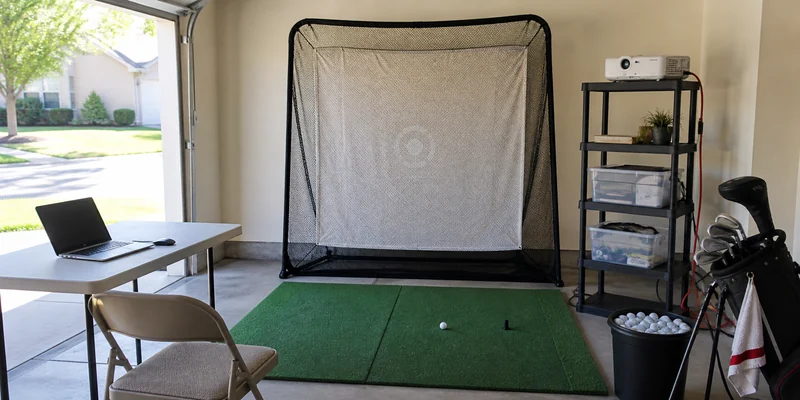
Last updated: August 10, 2026
A budget golf simulator is not a scaled-down copy of a premium studio; it is a different set of decisions with a different definition of success. The premium build chases immersion and tour-grade data. The budget build chases one thing: real swings, at home, all winter, without a purchase you regret. Done in the right order, an entry setup delivers exactly that, and everything you buy carries over when the budget eventually grows.
The order is the trick. Budget builders who start with the screen and projector end up with a beautiful wall and no data; the ones who start with the hitting essentials and the tracking layer get a working simulator fast. This guide lays out that order, the entry-level hardware owners consistently rate as worth it, and the traps that waste small budgets. Recommendations rest on specifications and recurring owner feedback, not on hands-on testing of our own.
This article contains affiliate links. If you buy through them, we may earn a commission at no extra cost to you. Learn more.
Quick Answer
What is the best budget golf simulator setup?
- The cheapest complete simulator is an OptiShot package plus a laptop: included courses, real clubs, club-based tracking, playable the day it arrives.
- The best value path for data-focused golfers is net and mat first, then a Garmin Approach R10 when funds allow; every piece survives later upgrades.
- Skip the projector and screen at this tier: a phone, tablet, or TV shows the same shot, and the immersion layer can always come later.
The Budget Build Order
Spend in this order and no dollar is wasted, whatever your ceiling. Each stage is a working setup on its own, not a down payment on the next one.
| Stage | What you buy | What you can do after this stage |
|---|---|---|
| 1. Hitting essentials | A solid net and a cushioned mat | Full-swing practice at home, every day, no screen required |
| 2. Tracking layer | An entry simulator package or an affordable launch monitor | Shot data or simulated rounds; this is where practice becomes a simulator |
| 3. Display upgrade | Cast to a TV, or add a used projector and screen later | Bigger picture, same golf; purely quality-of-life |
| 4. Room polish | Turf, padding, lighting | The studio feel, funded by a budget that has had time to recover |
Not sure what the tiers above this one buy? The simulator cost explainer breaks down what actually drives price between entry, mid-range, and premium builds, no sales pitch attached.
The Two Budget Philosophies: Play Now or Measure First
Entry-level simulation offers two honest paths. The play-now path is a sensor-mat package like OptiShot: courses included, multiplayer with friends, and the fun arrives immediately. The tracking is club-based rather than ball-based, which means the numbers describe your club through impact rather than true ball flight; treat them as consistent feedback rather than gospel and the value is real. Our full OptiShot review covers exactly where that trade sits.
The measure-first path builds around a real launch monitor and skips simulated courses until later. It costs more at the tracking stage but produces ball-flight data with a future: the same unit anchors any upgrade you ever make. Which path fits you comes down to whether winter evenings should feel like playing golf or like practicing it. Both are legitimate; buying neither properly is the only wrong answer.
Our Top Budget Picks
How we chose: we compared entry-level components on completeness out of the box, durability owners report at this price class, and how well each purchase survives a later upgrade. Specifications and owner feedback patterns drive the list, not in-house trials.
🏆 Best Value Simulator
The classic entry package: an infrared sensor mat that reads your club through impact and plays included simulated courses on a laptop. Multiplayer works with any clubs in the bag, and setup is genuinely simple. Expanded course content is available through the company’s software plans.

💛 Best Budget Net
A sturdy freestanding hitting net that handles daily full swings and folds away between sessions. Reviews consistently mention frame quality relative to its class, which is the spec that decides whether a budget net lasts. Give it clearance; no net catches every miss.

⛳ Best Budget Mat
A cushioned hitting mat that protects wrists and club soles without the premium-turf price. Owners consistently mention it as the component that outlives the rest of the starter kit, which is exactly what stage one needs.

The Stretch Upgrades That Earn Their Keep
Two purchases sit just above the entry tier and reward saving for rather than settling under. The first is a true launch monitor, which converts the net-and-mat setup into a data machine and remains the heart of every future version of your simulator. The second is a real-ball impact screen, which becomes worthwhile only once a projector enters the picture; until then, the TV on the wall does the same job for free.
🎯 Best Stretch Upgrade
The budget-tier ceiling breaker: a portable radar launch monitor with real ball data and phone-based simulation. Range practice modes work on the free app, while full course play needs a Garmin Golf membership tier. Owners consistently call it the point where the setup started feeling permanent.

🧰 Best Budget Screen and Frame
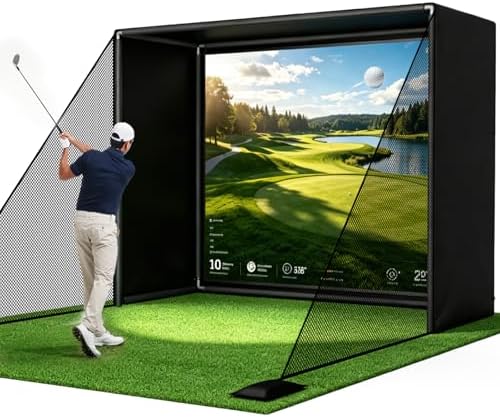
An affordable enclosure with impact screen for the moment a projector joins the build. At this tier, check the screen’s real-ball rating and the listed clearance requirements carefully; that is where budget enclosures differ most.
Making Entry Gear Last
Budget setups reward small maintenance habits that premium gear forgives. Rotate where you stand and strike on the mat so one spot does not wear bald, brush the turf occasionally to keep it standing, and store roll-up pieces flat rather than leaning in a corner. Nets live longest when the tension is checked every few weeks and the net is not left pitched against direct sun in a window bay; UV is the quiet killer of budget netting.
Electronics-side, keep sensor pads and monitors dust-free and cable connections strain-relieved, and update the companion software when prompted, since entry platforms fix quirks in software far more often than in hardware. None of this takes five minutes a month, and it is the difference between entry gear that bridges to your upgrade and entry gear that becomes the reason for it.
Common Mistakes to Avoid
- Buying the projector first. It is the most cinematic purchase and the least useful without tracking. Screen and projector are stage three, not stage one.
- Expecting ball-flight accuracy from club-based tracking. Sensor-mat systems measure the club, not the ball. Enjoy them for what they are and upgrade the tracking layer when data starts to matter.
- Going too cheap on the mat. The mat absorbs every single swing. A sore wrist in February is the most expensive saving in this hobby.
- Forgetting software costs at any tier. Course play often needs a membership, license, or plan even on budget hardware. Check what is included before counting on a feature.
- Buying gear the room cannot hold. Budget pressure tempts people into skipping the measuring step. Clearance rules apply to cheap setups exactly as they do to studios: roughly 9 to 10 ft of ceiling for most golfers.
Where to Go From Here
If your space is the constraint as much as the budget, the portable simulator guide shows setups that pack away, and the room dimensions guide confirms what your room can host before you order. Handy with tools? The DIY simulator walkthrough squeezes more setup out of the same spend. And when you are ready to compare tracking hardware seriously, start at the launch monitor guide.
Frequently Asked Questions
What is the cheapest way to get a golf simulator at home? An OptiShot-style sensor package with a laptop, or a net and mat now with a launch monitor later. Both paths avoid wasted purchases; which is better depends on whether you want to play or to measure first.
Is a budget golf simulator accurate? Entry sensor-mat systems track the club rather than the ball, so their numbers are feedback rather than flight data. Affordable radar units like the Garmin Approach R10 are generally reported to deliver meaningful ball data for the class.
Do I need a projector and screen? No. A phone, tablet, or TV displays the same shot result. The projected fairway is a later luxury, and skipping it at first is the single biggest saving available.
What should I spend the most on? The tracking layer, then the mat. One creates the simulator, the other protects your body. Nets and displays tolerate budget choices far better.
Will budget gear survive an upgrade later? Bought in the right order, yes: net, mat, and launch monitor all carry into a full studio build, as the home simulator hub lays out. Only the sensor-mat packages get replaced rather than absorbed.
The Bottom Line
A budget golf simulator succeeds by sequencing: net and mat for daily swings, an OptiShot package or Garmin Approach R10 for the tracking layer, and a TV instead of a projector until the budget breathes again. Spend most on tracking and the mat, verify your room’s clearance first, and every purchase survives the eventual upgrade.