Last updated: August 10, 2026
Searching for the best golf simulator for home use drops you into a market that runs from a sensor mat with software all the way to commercial rooms built around TrackMan or Foresight hardware. The good news is that the middle of that market has matured fast: a launch monitor, a net or impact screen, and a hitting mat now add up to a setup that lets you swing a real club at a real ball in your garage, basement, or spare room, all year round.
This guide is built the way buyers actually shop: by room and by budget. It walks through the launch monitor decision first, because that is the engine of every simulator, then covers software and subscriptions, then matches complete setups to garages, basements, sheds, and man caves. Every recommendation is based on manufacturer specifications and recurring themes in owner feedback, not on hands-on testing of our own.
This article contains affiliate links. If you buy through them, we may earn a commission at no extra cost to you. Learn more.
Quick Answer
Which golf simulator should you build at home?
- For most golfers, a Garmin Approach R10 paired with a quality net and hitting mat is the sweet spot: real ball data, simulator play on a screen or tablet, and a setup that fits a garage bay.
- On a tight budget, an OptiShot package gets you swinging real clubs at simulated courses for the least money, as long as you accept club-based rather than ball-based tracking.
- If you want a proper studio, step up to a complete enclosure package with an impact screen and projector, driven by a Garmin Approach R50 or comparable launch monitor.
How to Choose: The Five Decisions That Matter
Every home simulator is the same five decisions in a different order. Get these right and the brand names almost pick themselves.
| Decision | Why it matters | What to look for |
|---|---|---|
| Room and space | Ceiling height and swing clearance rule setups in or out before anything else | Most golfers need roughly 9 to 10 ft ceilings for a full swing; always check the listed space requirements of the unit you buy |
| Launch monitor tech | Radar and camera units behave differently indoors | Radar (Garmin, FlightScope Mevo) wants room depth and does well with flight; camera units are generally reported to be stronger in tight indoor spaces |
| Software and subscriptions | Course play often sits behind a membership or license | Check which features need a paid tier before you buy; this is a bigger long-term cost driver than most accessories |
| Screen or net | Determines immersion, budget, and how the room is used | A net keeps costs down and packs away; an impact screen with projector turns the room into a true simulator studio |
| Budget tier | Entry, mid-range, and studio builds are different products | Decide whether you want swing practice with feedback or a full virtual golf experience, then buy the tier that matches |
If ceiling height or room depth is your open question, start with our guide to golf simulator room dimensions before you spend anything. It is the cheapest mistake-prevention in this hobby.
The Launch Monitor Is the Simulator
Strip away the screen and the turf and a golf simulator is a launch monitor plus software. The monitor measures your club and ball, the software turns those numbers into a shot on a virtual hole. That is why the monitor deserves most of your budget and most of your research time.
The technology split matters indoors. Radar units such as the Garmin Approach R10 and FlightScope Mevo track the ball in flight, which is why they are generally reported to be at their best outdoors or in longer rooms, with several feet of ball flight to observe. Camera-based units capture the ball right at impact, which tends to suit tight indoor bays. Our launch monitor guide compares the current field, and if terms like ball speed, spin, and smash factor are still fuzzy, the plain-English breakdown in launch monitor numbers explained is worth ten minutes before you buy anything.
Software and Subscriptions: Read This Before You Buy
Almost every simulator setup has a software story, and it is a core buying argument, not fine print. Garmin units come with the Garmin Golf app, but full virtual course play and the Home Tee Hero mode sit behind a paid membership tier. Third-party simulator software such as GSPro requires its own license, and E6 Connect works with tiered plans that unlock more courses and features. OptiShot packages ship with a set of playable courses included, with expanded content available through the company’s software plans.
None of this makes any product a bad buy, but it changes the real cost of ownership and it changes what the box on day one actually does. Be skeptical of any listing that implies everything is included unless it spells that out. Our simulator software guide maps which platforms work with which monitors and what each one gates behind a subscription.
Our Top Picks at a Glance
How we chose: we compared home simulator setups on tracking technology, indoor usability, software ecosystem and subscription requirements, space demands, and how consistently owners report reliable operation over time. Selections lean on manufacturer specifications and recurring themes in owner reviews.
One reassurance first: all three of these are proven, widely owned setups with large user communities, which matters when you hit a software question at nine on a winter evening.
🏆 Best Overall
A portable radar launch monitor that pairs with a net and mat for a complete home setup. It tracks real ball data, supports simulator play on a phone, tablet, or screen, and owners consistently praise how much capability it packs for its class. Full course play requires a Garmin Golf membership tier, so factor that in.

💛 Best Value
The classic entry point: an infrared sensor mat that reads your club through impact and plays simulated rounds on included courses. Tracking is club-based rather than ball-based, so treat the numbers as practice feedback rather than gospel, but no setup gets you playing golf indoors for less.

⭐ Upgrade Pick
Garmin’s flagship home unit: a camera-based launch monitor with a built-in display and simulator software on board, designed to anchor a serious studio build. It is genuinely premium, and reviews consistently mention that it removes the laptop-and-cables friction of cheaper setups. Check which course features sit behind Garmin’s membership before ordering.

The Right Setup for Every Room
Answer first, by room. In a garage, the winning formula is a net or enclosure across one bay, a quality mat over the concrete, and a launch monitor; our garage golf simulator guide covers car-sharing layouts and cold-weather practice. In a basement, ceiling height decides everything, and our basement golf simulator guide walks through what works under a typical joist height, including which clubs to practice with.
In a backyard shed, you get a dedicated golf room with no household negotiation, but power, insulation, and ventilation move to the top of the list; the golf simulator shed guide covers the build order. And if the goal is a room your friends never want to leave, the man cave simulator guide leans into projector, seating, and multiplayer software. Renters and small-space golfers should start with the portable simulator options that pack away between sessions.
Picks by Room and Budget
Three more setups for the most common situations, each covered in depth in its own guide.
🧰 Best Complete Studio Package
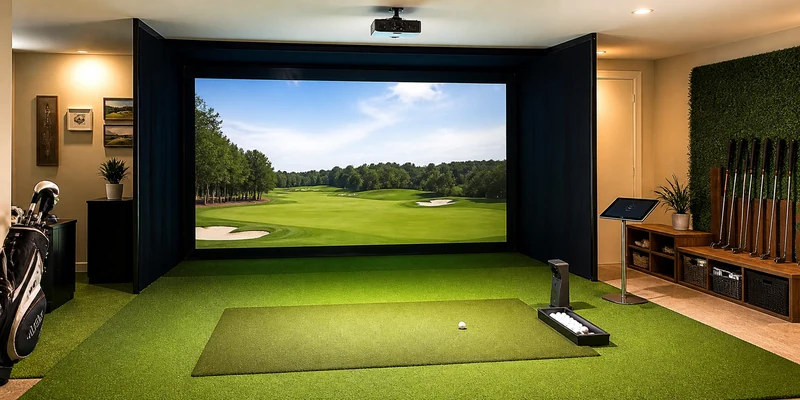
An all-in-one enclosure package with impact screen, side barriers, and hitting mat, sized for a garage bay or dedicated room. Pair it with the launch monitor of your choice and a short throw projector for a true simulator studio. Confirm the listed dimensions against your room before ordering.

⛳ Best for Small Spaces and Renters
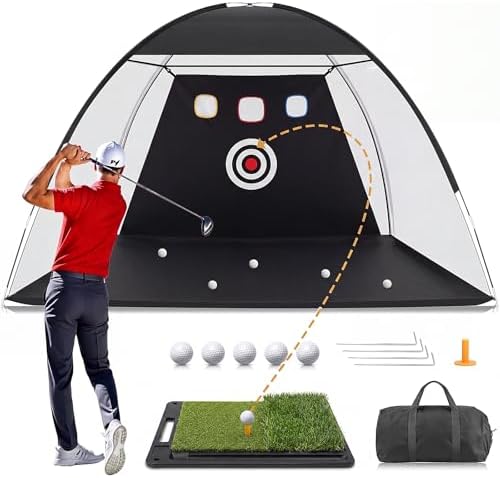
A quality practice net and hitting mat combination that sets up in minutes and stores flat. Add a launch monitor when the budget allows; the net does not care what measures the shot. Owners consistently mention how much use these get precisely because nothing has to be planned around them.
🎯 Best Budget Screen Upgrade
A dedicated impact screen that replaces a plain net once you want projected courses instead of a black mesh. Combined with an entry projector it is the cheapest route from practice cage to simulator room. Check the material rating for real golf balls before you buy any screen.

Screens, Nets, and What Your Ball Flies Into
Every indoor swing ends with the ball hitting something, and that something is a safety decision as much as a budget one. A net is the affordable default and packs away, but no net catches every conceivable miss, so position it with clearance and keep people and glass out of the line of play. Our simulator net guide covers the options.
An impact screen takes real balls and doubles as your projection surface, which is what turns a practice cage into a simulator. It needs a frame or enclosure to hang from and benefits from padding around the edges; the enclosure guide and impact screen guide break down the builds. Whichever route you take, buy the mat you will actually hit off a thousand times with the same care; wrists notice cheap turf long before wallets recover.
Common Mistakes to Avoid
- Buying the simulator before measuring the room. Ceiling height, width for your swing, and depth for the monitor are non-negotiable. Measure first, then shop.
- Ignoring subscription requirements. Course play on many platforms needs a membership or license. Price the software into year one before comparing hardware.
- Putting a radar unit in a too-short room. Radar monitors want space behind the ball and flight in front of it. In a tight bay, a camera-based unit is generally the happier choice.
- Treating a net as bulletproof. Nets are rated for normal use, not for every wild miss. Leave clearance, check the seams occasionally, and keep spectators behind the hitting line.
- Cheaping out on the mat. A thin mat off hard concrete is rough on joints and clubs alike. It is the component you physically interact with on every single swing.
Where to Go From Here
If the numbers side of the decision is still open, our simulator cost breakdown explains what actually drives the price between entry, mid-range, and premium builds, without the sales gloss. Budget-first shoppers should read the budget simulator guide, and anyone who prefers one box with everything in it can compare complete simulator packages. Curious how honest the technology really is? The simulator accuracy explainer covers what radar and camera systems each do well.
Frequently Asked Questions
What do I need for a golf simulator at home? Four things: a launch monitor, something safe to hit into (net or impact screen), a hitting mat, and software to display the shot. A projector is optional but is what creates the true simulator feel.
How much ceiling height do I need? Most golfers need roughly 9 to 10 ft of ceiling for a comfortable full swing with a driver, and taller players should test their swing in the space first. The full logic is in our room dimensions guide.
Do golf simulators require a subscription? Many do for full course play: Garmin gates its course modes behind a membership tier, GSPro uses a license, and E6 Connect has tiered plans. Practice-range features usually work without one, but always check the specific unit.
Are home golf simulators accurate? Mid-range units are generally reported to be accurate enough for meaningful practice, with camera systems favored indoors and radar systems favored where the ball can fly. Our accuracy explainer covers the honest limits.
Can I use a golf simulator in a garage with a car in it? Often yes, if the bay is deep enough to clear your swing and the setup packs away or folds up. The layouts that make this work are covered in the garage guide.
The Bottom Line
The best golf simulator for home use is the one your room can actually hold: a Garmin Approach R10 with net and mat for most golfers, an OptiShot package for the smallest budgets, and a full enclosure build around a Garmin Approach R50 or comparable unit when you want a studio. Measure the room, price the software subscription honestly, and spend the rest on the launch monitor.