Last updated: August 10, 2026
Most golfers meet the OptiShot golf simulator at the exact moment the hobby gets real: winter is coming, the premium simulator quotes are sobering, and here is a package promising simulated rounds at home for a fraction of everything else on the page. OptiShot has owned that entry slot for years with a simple idea: put the sensors in the swing pad instead of tracking the ball, bundle the software and courses, and make indoor golf a single affordable box.
This review reads the OptiShot 2 the way a careful buyer should: what the club-based tracking genuinely delivers, where it stops being enough, and who ends up happy with one. It is an assessment of specifications and long-term owner feedback patterns, not a hands-on lab test.
This article contains affiliate links. If you buy through them, we may earn a commission at no extra cost to you. Learn more.
Quick Answer
Is the OptiShot golf simulator worth buying?
- Yes, as entertainment and winter swing-keeping: no cheaper setup gets you playing simulated rounds at home with your own clubs, and multiplayer evenings are genuinely fun.
- Understand the core trade: the sensor pad reads your club through impact, not the ball, so numbers are practice feedback rather than true flight data.
- Skip it if you want data you can trust for club decisions; that is launch monitor territory, and the budget path there starts with the Garmin Approach R10.
OptiShot at a Glance
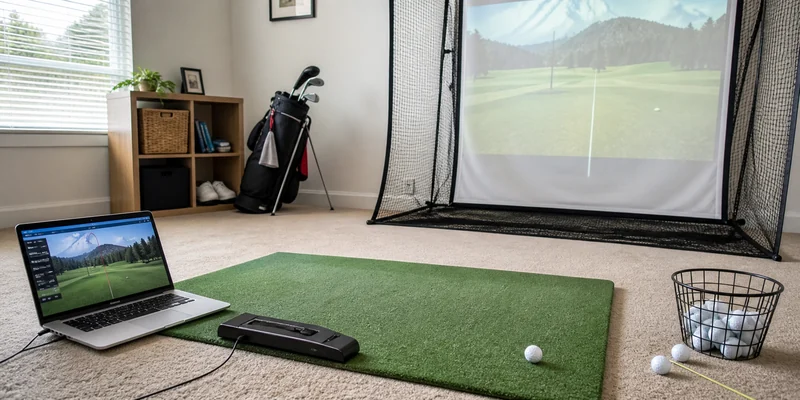
OptiShot sells the entry ticket to simulated golf: a sensor pad, bundled software, and included courses that run on a computer you already own.
| Category | What to know |
|---|---|
| What it is | A swing pad with infrared sensors that read the club through the hitting zone, plus simulator software |
| Tracking type | Club-based: club speed, face angle, and path at impact drive a simulated ball flight |
| What it needs | A computer to run the software, room to swing, and ideally a net; it can be used with real balls into a net, foam balls, or no ball at all |
| Courses and software | A set of simulated courses comes included; expanded content and newer platform features are offered through OptiShot’s software plans |
| Space demands | Modest: no ball flight is measured, so it fits rooms where radar units cannot work; normal swing clearance still applies |
| Ideal for | Budget-first buyers, dim basements, social play, keeping the swing moving all winter |
| Less ideal for | Golfers who want trustworthy ball data, fitting-grade numbers, or serious practice analytics |
What the OptiShot Gets Right
The value proposition first, because it is the whole thesis: one affordable box turns a spare room into a place where golf happens. Owners consistently describe the setup as genuinely easy, the software as immediately playable, and the multiplayer rounds as the sleeper feature; friends can grab any club and join, which makes the OptiShot a better party machine than hardware costing multiples more.
The sensor-pad design also has quiet practical advantages. Because nothing tracks the ball, the system does not care that your basement is dim, your ceiling forced a shorter club, or your net sits close; it works in rooms that defeat camera and radar units. And swinging real clubs through a real impact zone all winter has honest practice value: rhythm, routine, and face awareness do not hibernate, even when the numbers are simulated. Golfers who want that in the smallest possible space often start exactly here, as our budget simulator guide lays out.
Where It Falls Short
The tracking trade-off is the headline limitation and deserves plain language: infrared sensors in a pad measure the club passing over them, then calculate a simulated flight. Face contact, true ball speed, spin, and curvature are inferred, not measured, so the reported distances and shot shapes are generally reported by owners to flatter some swings and misread others, especially with wedges and deliberate shot-shaping. As feedback it is directionally useful; as data for buying clubs or trusting carry numbers it is the wrong tool, a distinction our launch monitor numbers explainer makes concrete.
Durability feedback is mostly positive for a product at this tier, though long-term owners mention worn turf strips over the sensors and occasional sensor hiccups as the common service items. The software ecosystem is the other soft spot: it runs on your computer rather than a slick built-in display, and the more current courses and features sit in OptiShot’s paid software plans, which is worth pricing into the decision.
How It Compares
Against the Garmin Approach R10, the comparison is really club data versus ball data. The R10 costs more and wants more room depth, but its radar measures the actual ball, which changes what the numbers are worth; for many buyers the honest question is whether to start with OptiShot now or save toward the R10 tier. Against premium camera units like the Garmin Approach R50 or the commercial names, TrackMan, Foresight, Full Swing, the OptiShot is not competing at all; those exist in another conversation about accuracy and budget entirely. Within its own class, sensor-mat rivals exist, but OptiShot’s years of software maturity and its large owner community are exactly the moats reviews keep mentioning. The wider field is mapped in our home simulator hub.
Check It Out
How we chose: the OptiShot 2 package is the configuration nearly all owner feedback concerns and the version that bundles the pad, software, and included courses most buyers want first.
🏆 The Budget Simulator Standard
The sensor-pad package with software and included courses that defines the entry tier: real clubs, simulated rounds, multiplayer with friends, and setup measured in minutes. Pair it with a net for real-ball practice.

Who It Is For, and Who Should Skip It
Buy the OptiShot if the goal is playing golf indoors this winter at the lowest workable cost: family rounds, social evenings, keeping the swing from rusting, and doing it in a room too small or too dim for ball-tracking hardware. It is also the rational first step for anyone unsure whether the simulator habit will stick, because the commitment is small and the fun is immediate.
Skip it if you will squint at the numbers. Golfers who care about true carry distances, spin, and dispersion outgrow club-based tracking quickly, and the upgrade itch arrives mid-season. In that case, put the same budget toward a net, a mat, and a real launch monitor from our launch monitor guide, and add the course-play layer later.
Alternatives Worth Considering
Three directions, depending on which OptiShot limitation matters most to you.
⭐ Upgrade Alternative
The portable radar unit that measures the actual ball: speed, launch, and simulated rounds on a phone or tablet. Range modes work on the free app; full course play needs a Garmin Golf membership tier. The natural next rung on the ladder.

💛 Practice-First Alternative
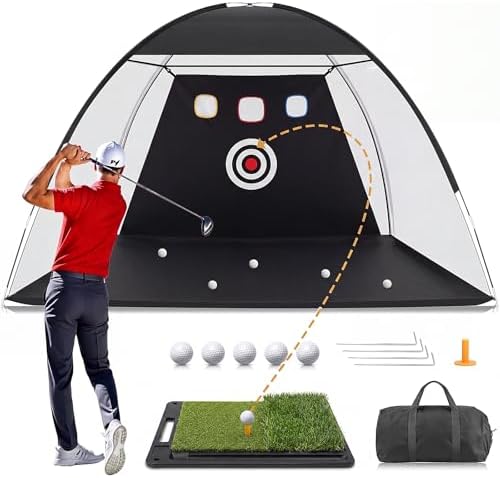
A net and mat pairing for the same money-conscious buyer who would rather groove real contact than play simulated holes. It later pairs with any launch monitor, so nothing is wasted.
🎯 Immersion Alternative
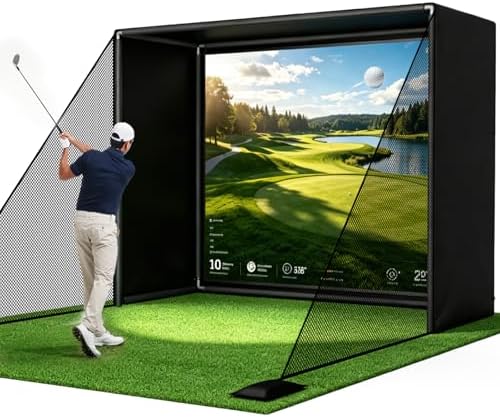
An affordable enclosure and impact screen for buyers whose real itch is the projected-fairway feel; combined with a monitor later, it becomes the full studio the OptiShot only hints at.
Frequently Asked Questions
How accurate is the OptiShot golf simulator? It measures the club, not the ball, so flight is simulated from impact data. Owners generally report it as consistent enough for feedback and fun, but not a source of trustworthy carry or spin numbers.
Do you need a net or real balls to use it? No. It works with foam balls or even without a ball, though most owners prefer hitting something real into a net for feel. Position any net with clearance, since no net catches every miss.
Does OptiShot require a subscription? The package includes software and a set of courses. Expanded course content and newer platform features are offered through OptiShot’s paid software plans, so check what the current bundle includes before buying.
What space does an OptiShot setup need? Room to swing your chosen clubs safely, which for most golfers means roughly 9 to 10 ft of ceiling for a driver, less if you build around irons. Our room dimensions guide covers the checks.
OptiShot or a launch monitor? OptiShot for the cheapest playable golf and social rounds; a launch monitor like the Garmin Approach R10 when the numbers themselves are the point. Many golfers deliberately start with one and graduate to the other.
The Bottom Line
The OptiShot 2 is the honest bargain of home golf: simulated rounds, multiplayer fun, and a winter’s worth of real swings for the least money in the category, paid for with club-based numbers you should enjoy rather than trust. Buy it as entertainment with practice benefits and it over-delivers; buy it as a measuring instrument and you bought the wrong tool.