Last updated: August 10, 2026
The right golf simulator accessories are the difference between a bay you use and a bay you fuss with. Nothing on this page is essential on day one, and that is exactly the point: these are the small purchases owners consistently say they should have made sooner, from tees that survive mat life to the ball tray that ends the crouch-and-scatter routine between shots.
This guide sorts the accessory shelf by what each item actually fixes: workflow between shots, equipment protection, practice variety, and comfort during long sessions. Everything here matches the widely available product types you will find without hunting down specialty shops.
This article contains affiliate links. If you buy through them, we may earn a commission at no extra cost to you. Learn more.
Quick Answer
Which golf simulator accessories are actually worth buying?
- First: rubber simulator tees in several heights, because wooden tees and hitting mats do not get along.
- Second: a ball tray or ball caddy at hip height, which quietly removes the most repeated annoyance in simulator practice.
- Then by situation: a device stand for the sim display, foam balls for family sessions, and organizers that keep the bay ready instead of cluttered.
The Accessory Shelf at a Glance
Every accessory below earns its spot by solving one specific, recurring problem. Skip anything whose problem you do not have.
| Accessory | Problem it solves | Worth it for |
|---|---|---|
| Rubber mat tees | Wooden tees will not sit in dense mats and snap when they do | Everyone, from the first session |
| Ball tray or caddy | Bending to floor-scattered balls between every shot | Everyone hitting volume |
| Device or laptop stand | The sim display balanced on a chair | Net setups and tablet-based sims especially |
| Foam practice balls | Real-ball risk during family or casual use | Households with kids or shared rooms |
| Club and gear organizer | Clubs leaning on walls, gear migrating | Permanent bays that want to stay tidy |
| Alignment sticks | Drifting aim and setup on a mat with no visual cues | Golfers doing structured practice |
Accessories assume the core bay exists. If the big components are still open questions, start with the enclosure guide and the simulator mat guide before decorating the edges.
Workflow First: The Between-Shots Experience
Simulator practice lives or dies on rhythm. On a range, the next ball is a rake-pull away; in a home bay without accessories, it is a bend, a search, and a re-tee. Multiply that by a hundred balls and the friction is real. A ball tray at hip height beside the mat, kept stocked, restores the range rhythm, and rubber tees in two or three heights mean the driver-to-iron switch takes seconds instead of a rummage.
The display deserves the same thinking. Simulator software wants to be glanceable between shots: a tablet or laptop at standing eye height beside the hitting zone, not on the floor behind you. A simple adjustable stand solves it, and monitor-app pairings are covered in our simulator software guide if the software side is still unsettled.
Our Top Accessory Picks
How we chose: we prioritized the accessories owners most often mention buying second, once real use exposed the gaps, based on recurring themes in customer reviews and manufacturer specifications rather than any hands-on trial of our own.
The first three cover the near-universal gaps; the second group is situational.
🏆 Best First Buy
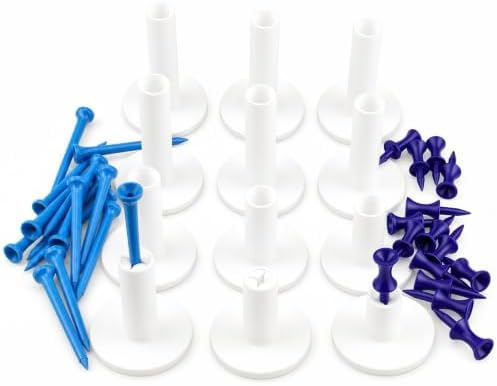
Rubber simulator tees in assorted heights that sit securely on a hitting mat and flex on contact instead of snapping, the accessory every mat-based setup ends up owning.
💛 Best Workflow Upgrade
A golf ball tray or caddy that holds a session’s worth of balls at hand height beside the mat, ending the crouch-and-scatter routine that owners consistently name as the first annoyance fixed.

🖥️ Best for the Display
An adjustable stand that puts the tablet or laptop running your sim at standing eye height beside the bay, stable enough to survive the occasional bump.

Situational Picks: Shared Rooms and Serious Practice
These three depend on who uses the bay and how structured the practice gets.
🧒 Best for Family Sessions
Foam practice balls that let kids and guests swing freely with far less risk to the room and each other; several launch monitors also read them acceptably for casual play.

📏 Best for Structured Practice
Alignment sticks, the cheapest training aid in golf, restoring the aim and ball-position discipline that a featureless mat quietly erodes.

🗄️ Best for Keeping the Bay Ready
A club rack and organizer that gives clubs, balls, and tees a permanent home in the bay, so every session starts with hitting instead of gathering.

Setting Up the Accessory Layer
Place the ball tray on your trail side at hip height so reloading never crosses the hitting zone, and the display stand on the opposite side at a glance angle rather than dead ahead, where it would tempt you to look up early. Keep spare tees in a fixed spot on the mat’s edge. The goal is a bay where a full session never requires leaving the hitting area, which is exactly the standard a commercial studio meets.
Comfort accessories deserve a mention for long sessions too. An anti-fatigue mat behind the hitting area helps if your stance mat is thin, a small fan changes summer garage sessions entirely, and a towel hook near the bay keeps grips dry without a hunt. None of these are golf products, which is exactly why builders forget them until the third sweaty evening.
Resist the urge to buy the whole shelf at once. Owners consistently describe the same sequence: tees immediately, ball management within a month, display stand when the neck complains, and everything else as specific itches appear. Accessories bought against real friction get used; accessories bought speculatively collect dust in exactly the corner the organizer was supposed to fix.
Common Mistakes to Avoid
- Using wooden tees on a mat. They will not seat properly in dense turf and shear on contact. Rubber tees exist precisely for this surface.
- Letting balls live on the floor. Loose balls around a hitting zone are a rolling hazard as much as an annoyance. Tray or caddy, always.
- Putting the display in the ball’s world. Screens and ricochets share a room badly. Keep stands beside or behind the hitting zone, out of the plane of play.
- Assuming foam balls read like real balls. They are excellent for safety and rhythm, but launch monitors report them differently. Treat foam-ball numbers as practice, not gospel; our launch monitor numbers guide explains what the readings mean.
- Buying organization before establishing habits. A rack helps a bay that gets used. Use first, organize second.
Where to Go From Here
Accessories polish a bay whose fundamentals are settled. If any core component still needs choosing, the mat guide, net guide, and projector guide handle the big three, and the complete build order lives at best golf simulator for home. Several items here also make reliable gifts, a theme our gifts for golfers guide runs with.
Frequently Asked Questions
What accessories do I need for a golf simulator? Strictly, none: monitor, mat, and net or screen make a working bay. In practice, rubber mat tees and a ball tray improve every session enough that most owners call them essential in hindsight.
Do rubber tees work with a driver? Yes, that is their home turf. Buy an assorted-height set so driver, fairway wood, and iron setups each have a tee that fits, and expect them to outlast wooden tees by months.
Can I use foam balls with my launch monitor? Many camera and radar units will register them, with readings that differ from real balls. They are great for casual and family sessions; switch to real balls when the numbers matter.
What should I put the simulator software on? Whatever you own that runs it well, positioned at standing eye height beside the bay. A sturdy stand matters more than the device; a falling tablet ends sessions faster than any software bug.
Are alignment sticks useful indoors? Arguably more than outdoors. A mat gives no aim feedback, and a stick along your foot line keeps setup honest while the screen draws your eye forward.
The Bottom Line
Buy simulator accessories in the order real friction appears: rubber tees first, ball management second, a display stand third, and the situational extras as the bay’s use reveals them. Each pick here removes one specific annoyance, and together they turn a collection of equipment into a practice space that invites daily use.