Last updated: August 10, 2026
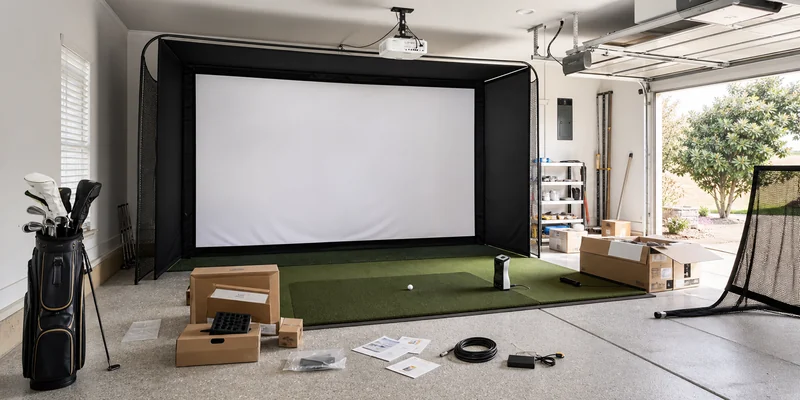
A golf simulator package promises to collapse a dozen research rabbit holes into one order: enclosure, impact screen, mat, sometimes a launch monitor and projector, all sized to work together. For a lot of buyers that promise is exactly right, because component matching, screen size to throw ratio to room depth, is where first builds go wrong. For others, a package means paying for pieces they already own or would have chosen differently.
This guide sorts the package market honestly: what complete kits actually include at each tier, the compatibility checks that matter more than any brand name, and when assembling your own bundle beats the box. As always on this site, recommendations are built on manufacturer specifications and consistent owner feedback, not hands-on testing of our own.
This article contains affiliate links. If you buy through them, we may earn a commission at no extra cost to you. Learn more.
Quick Answer
Should you buy a golf simulator package or build your own?
- Buy a package if you are starting from zero: enclosure, screen, and mat arrive pre-matched, which eliminates the most common first-build mistakes.
- Build your own if you already own a launch monitor or have unusual room dimensions; packages assume standard spaces.
- Either way, verify three numbers before ordering: your ceiling height, the frame’s listed dimensions, and the launch monitor’s placement requirements. Packages solve matching, not physics.
What Packages Include, Tier by Tier
Package is a stretchy word in this market. This is what the label typically covers at each level, and what still arrives in a separate box.
| Tier | Typically included | Usually still needed |
|---|---|---|
| Starter kit | Net or basic screen, frame, hitting mat | Launch monitor, display device, software |
| Enclosure package | Full frame, real-ball impact screen, side barriers, often a mat | Launch monitor, projector, software subscription or license |
| Studio package | Enclosure, screen, mat, projector mount, sometimes the projector | Launch monitor in many cases; always check the listing line by line |
| All-in-one simulator package | Everything above plus a launch monitor and software access | Course play may still need a membership or license tier; confirm what is unlocked |
The single most useful habit when comparing kits: open the what’s-in-the-box list and tick it against the four-part checklist from our home simulator hub: tracking, something to hit into, a mat, and software. Any gap is your real remaining budget.
The Three Compatibility Checks That Matter
First, the room. A package’s frame has listed outer dimensions and the screen has a recommended clearance behind it; your room needs both, plus swing clearance, roughly 9 to 10 ft of ceiling for most golfers. The room dimensions guide walks the measuring. Second, the projector geometry: screen size and throw distance must match the projector’s throw ratio, which is why packages that include the mount but not the projector deserve extra attention before checkout.
Third, and most often missed: the launch monitor’s placement requirements versus the enclosure layout. Radar units sit behind the ball and want flight room in front; camera units sit beside or ahead of the hitting zone. A package sized tightly around a camera unit can be too shallow for radar, so decide on your tracking hardware before committing to a frame, not after.
Our Top Package Picks
How we chose: we compared widely available kits on completeness, screen and frame quality for the class, honesty of the included-items list, and how consistently owners report smooth assembly and durability. Specifications and owner feedback patterns drive the picks, not in-house trials.
🏆 Best Overall
A complete enclosure package with real-ball impact screen, full frame, side barriers, and hitting mat: the whole hitting end of a simulator room, pre-matched. Add your launch monitor and projector. Check the listed frame height against your true ceiling clearance before ordering.

💛 Best Value
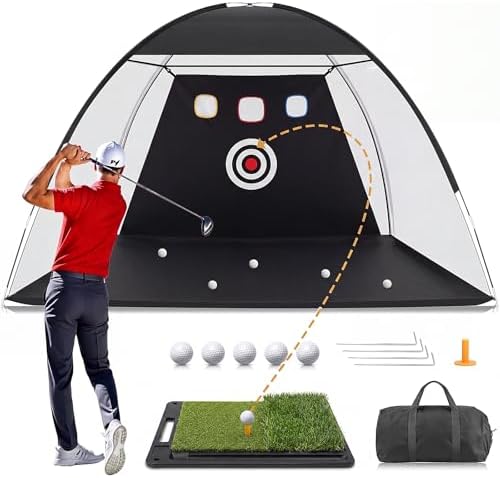
A net-and-mat starter kit of the type that dominates this class in owner mentions. It is a practice setup on day one and becomes the safety layer of a bigger build later, which is what makes it the low-regret way to start.
⭐ Upgrade Pick
A studio-class package that pairs the enclosure and screen with projector mounting and a coordinated mat, aimed at dedicated rooms. Confirm exactly which electronics are included, and note that course-play software typically still involves its own license or membership tier.

When Building Your Own Bundle Wins
Packages assume a standard room and a buyer starting from nothing. Break either assumption and piecemeal wins. If you already own a launch monitor, an all-in-one kit makes you pay twice for tracking. If your space is low, narrow, or oddly shaped, a custom frame or a component-by-component build fits where no stock package will; start with the enclosure guide and impact screen guide and size each piece to the room.
Two component picks earn a place in almost any self-assembled bundle.
🎯 Best Budget Enclosure for Self-Builders
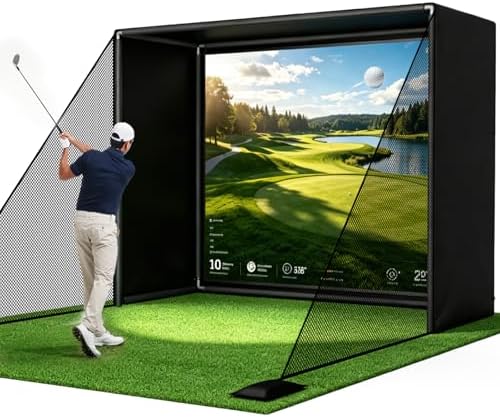
An affordable frame-and-screen kit that anchors a piecemeal build. At this price class, inspect the screen’s real-ball rating and the listed clearance requirement; that is where budget enclosures differ most from premium ones.
⛳ Best Tracking Add-On
The launch monitor most owners pair with screen-only packages: portable, radar-based, and phone-driven. Range modes run on the free app while full course play needs a Garmin Golf membership tier, so budget the software line alongside the hardware.

Assembly and Living With a Kit
Package assembly is honest work rather than hard work: most enclosure kits go up in an afternoon with two people, a stepladder, and patience with fabric tensioning. The step owners consistently flag as worth slowing down for is squaring the frame before the screen goes taut, since a skewed frame telegraphs through the projected image forever after. Leave the screen slightly slack on first assembly, check the image geometry with the projector, then tension to final fit.
Living with the kit is mostly maintenance rhythm. Check screen tension and frame fasteners every few weeks in the heavy season, rotate the hitting mat’s strike zone if the design allows it, and keep a soft brush handy for the screen face; ball marks wipe away easily when fresh and stubbornly when old. A package treated this way ages in years, not seasons.
Common Mistakes to Avoid
- Assuming the launch monitor is included. Many enclosure and studio packages are everything except the tracking. Read the included-items list twice; it is the most expensive missing line in the category.
- Ordering the frame before measuring the ceiling. Listed frame height plus your room’s lowest obstruction decides fit, not the product photos. Physics does not negotiate with packaging.
- Ignoring the clearance behind the screen. Impact screens need their listed gap to absorb shots. A package that technically fits wall-to-wall can still be a bad install.
- Forgetting the software line item. Even all-in-one kits often gate course play behind a membership or license. Confirm what is actually unlocked in the box.
- Paying for duplicates. If a net, mat, or monitor already lives in your garage, a partial bundle plus the missing pieces usually beats the full kit.
Where to Go From Here
If the budget question comes before the package question, the simulator cost explainer maps what entry, mid-range, and premium builds actually buy, and the budget simulator guide shows the staged path for smaller wallets. Choosing the projector separately? The projector guide covers throw ratios and mounting. And once the room is running, launch monitor numbers explained turns the new data into practice.
Frequently Asked Questions
What comes in a golf simulator package? It varies by tier: starter kits bundle a net and mat, enclosure packages add a frame and impact screen, and all-in-one kits add tracking and software access. The included-items list on each listing is the only authoritative answer.
Are simulator packages cheaper than buying components separately? Often somewhat, and they save matching mistakes, which is their real value. Self-building wins when you own components already or have a nonstandard room.
Do packages include the software? Sometimes access is bundled, but full course play frequently still requires a membership tier or license, as with Garmin’s course modes, GSPro, and E6 Connect plans. Verify before counting on it.
What size room do I need for a package? Enough for the frame’s listed dimensions, the screen’s clearance behind, swing room of roughly 9 to 10 ft of ceiling for most golfers, and your monitor’s placement. The room dimensions guide walks through it.
Which brands should I look at? In the widely available tier: GoSports and VEVOR for kits and enclosures, with premium names like Carl’s Place and Full Swing serving the custom and commercial end through their own channels.
The Bottom Line
A golf simulator package earns its keep by pre-matching the pieces that trip up first builds: frame, screen, and mat. Buy one when starting from zero and your room is standard; self-assemble when you own components or the space is odd. Whatever the box promises, the launch monitor, the software tier, and your ceiling height remain your homework.