Last updated: August 10, 2026
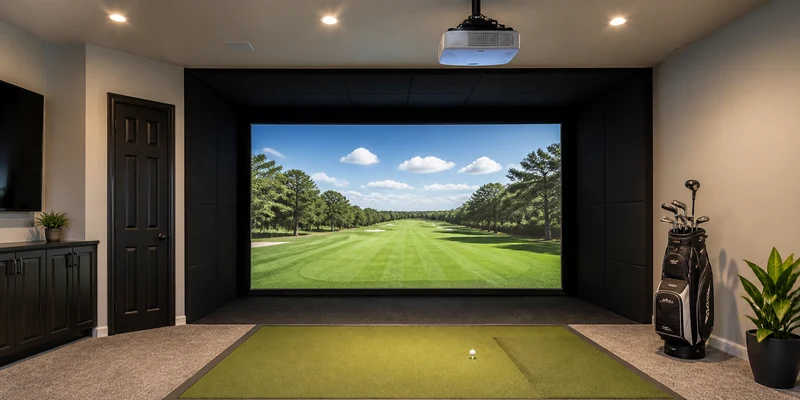
Finding the best golf simulator projector is less about picture-quality bragging rights and more about geometry. A simulator bay puts the projector in an awkward spot: close to a large screen, out of the swing path, and often in a room with more ambient light than a home theater. Ordinary projectors are designed for none of that, which is why a handful of short throw models dominate the category.
This guide explains the four specifications that decide whether a projector works in a golf bay: throw ratio, brightness, input lag, and aspect ratio handling. It then points to the models that come up again and again in simulator builds, from a budget favorite to a premium laser unit.
This article contains affiliate links. If you buy through them, we may earn a commission at no extra cost to you. Learn more.
Quick Answer
Which projector should you buy for a golf simulator?
- Buy a short throw projector: it fills a large screen from close range, which keeps the unit out of your swing and your shadow off the image.
- Prioritize brightness (lumens) if your room has ambient light, and low input lag so the picture responds without a noticeable delay after each shot.
- Check aspect ratio against your screen: projectors are typically 16:9 native, while many impact screens are squarer, closer to 4:3, so plan how the image will fit.
The Four Specs That Decide Everything
Projector spec sheets are long, but a simulator bay only interrogates four lines. Here is what each one means and what to look for.
| Specification | What it means | What to look for |
|---|---|---|
| Throw ratio | Distance to screen divided by image width; lower numbers project bigger from closer | Short throw models (commonly below about 1.0) fill a home-size screen from inside the bay without sitting in the swing path |
| Brightness (lumens) | How much light the projector outputs | More matters in rooms with windows or lighting; a bright unit keeps the fairway visible without blacking out the room |
| Input lag | Delay between the computer’s signal and the displayed image | Lower is better; models with a game or low-latency mode make the sim feel responsive after each shot |
| Aspect ratio | The shape of the projected image | Most projectors are 16:9 native; if your screen is squarer, look for flexible aspect and blanking options or plan to mask the overspill |
| Resolution | Detail in the projected picture | 1080p is the practical baseline; 4K adds sharpness on big screens at a higher cost |
| Light source | Lamp versus laser | Lamps are cheaper up front and eventually need replacing; laser units run brighter longer with less maintenance |
Screen and projector are one decision, not two. If you have not settled the screen yet, read the impact screen guide first, since screen size and shape define what the projector has to fill.
Short Throw vs Standard Throw: Why It Matters So Much
Throw ratio is the spec that disqualifies most ordinary projectors. A standard throw unit with a ratio around 1.5 needs roughly 15 feet of distance to paint a 10 foot wide image, which in a typical bay puts it behind the golfer, throwing their shadow onto the screen with every swing. A short throw unit with a ratio around 0.7 paints the same image from about 7 feet, close enough to mount above or ahead of the hitting area entirely.
That is the whole argument. Short throw placement keeps the projector out of the swing path, keeps shadows off the screen, and lets the image fill the enclosure in rooms where depth is scarce. Ultra short throw units that sit on the floor near the screen exist too, though floor placement in a golf bay puts hardware near ricochet territory, so most builders settle on a ceiling-mounted short throw model.
Brightness and Input Lag: The Comfort Specs
Lumens decide how the image survives your room. In a dark basement, almost any modern projector looks good. In a garage with daylight or a family room with lamps, a brighter unit keeps the projected fairway punchy where a dim one washes out to gray. The general rule: the more ambient light you cannot control, the more lumens you should buy, and enclosure side walls help by shading the screen. Our lighting and padding guide covers how to light the bay without fighting the image.
Input lag is the quiet spec that shapes how the simulator feels. Every shot triggers a chain from launch monitor to software to projector, and a display that adds a long delay makes the ball flight feel disconnected from the swing. Projectors marketed for gaming, with low-latency modes, keep that delay short. It is the same reason simulator software choices matter, a topic our simulator software guide explores.
Our Top Projector Picks
How we chose: we compared short throw projectors that appear consistently in home simulator builds on throw ratio, brightness, input lag, and how owners report them holding up in real bays. Selections lean on manufacturer specifications and recurring themes in customer reviews rather than any hands-on trial of our own.
All three picks are short throw models, because in this category placement flexibility beats every other feature.
🏆 Best Overall
A 4K short throw projector with a dedicated low input lag gaming mode and flexible installation adjustments that suit enclosure screens. A strong middle path between the budget and premium ends of the range.

💛 Best Value
The long-running budget favorite of the simulator community: a 1080p short throw unit with strong brightness for its class and a low-latency mode, which reviews consistently mention as the sensible entry point.

⭐ Upgrade Pick
A premium laser short throw projector with high brightness for rooms that cannot go fully dark, a maintenance-free laser light source, and installation flexibility aimed at permanent simulator studios.

Also Worth a Look
BenQ dominates simulator conversations, but it is not the only road in. One alternative earns a regular place in budget and mid-range builds.
🎥 Also Great
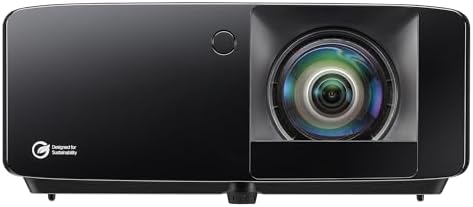
Optoma’s short throw gaming line pairs low input lag with solid brightness at friendly pricing, and owners report easy setup on enclosure screens. A natural cross-shop against the entry BenQ.
Mounting, Alignment, and Living With It
Ceiling mounting is the default for good reason: it clears the swing, shortens cable runs to a mounted PC shelf, and keeps the lens above ricochet height. Mount the projector square to the screen whenever possible, because keystone correction fixes geometry digitally at some cost to sharpness. Use the throw ratio to calculate the mounting distance before drilling anything: image width times throw ratio equals lens-to-screen distance.
Expect to spend one patient evening on alignment, zoom, and focus, then rarely touch it again. Dust the filter and lens on the schedule the manual suggests, and if you chose a lamp model, treat gradually dimming output as normal aging rather than a fault. Position matters for sound too: a projector directly over the hitting area puts its fan noise at the quietest point of your swing, which most golfers stop noticing within a session.
Common Mistakes to Avoid
- Buying a standard throw projector for a short room. Run the throw ratio math against your actual bay depth before purchasing. This one mistake produces most projector returns in the category.
- Ignoring aspect ratio. A 16:9 image on a squarer screen either letterboxes or spills light onto the enclosure. Decide in advance whether you will size the image to width, use blanking adjustments, or accept borders.
- Underbuying brightness for a bright room. Lumens you do not need cost little in practice; lumens you lack make every daytime session look washed out.
- Skipping game mode. Many projectors ship in a cinema mode with processing that adds lag. Switching to the low-latency mode is a one-time setting that changes the feel of the sim.
- Mounting in the ball’s neighborhood. Keep the projector out of the plane of play and above bounce height. Mishits happen, and lenses do not negotiate.
Where to Go From Here
If BenQ’s three-model ladder is where you are leaning, our BenQ golf projector review compares them in depth. The projector’s partner purchases are covered in the impact screen guide and the enclosure guide. And for the complete build, launch monitor and software included, start at best golf simulator for home.
Frequently Asked Questions
What throw ratio do I need for a golf simulator? Short throw, commonly below about 1.0, is the practical answer for most bays. Multiply your screen’s image width by the throw ratio to see exactly where the projector must sit, then check that spot clears your swing.
How many lumens should a golf simulator projector have? It depends on your room. Dark basements are forgiving, while garages with daylight reward the brightest unit you can budget. When in doubt, buy brighter; ambient light is harder to remove than to outshine.
Does input lag really matter for golf simulators? Yes, though less than in fast video games. Low lag keeps the ball flight feeling connected to your swing. A projector with a dedicated game or low-latency mode covers the need comfortably.
Can I use a regular home theater projector? Sometimes, if your room is deep enough for its throw ratio and dark enough for its brightness. Most home bays are neither, which is why short throw models are the standard recommendation.
Is 4K worth it over 1080p for a simulator? On a large enclosure screen viewed from a few feet away, 4K looks noticeably crisper. Whether that is worth the price gap is a budget call; 1080p remains completely playable and is where most first builds land.
The Bottom Line
The best golf simulator projector is a short throw model bright enough for your room, quick enough to feel responsive, and shaped to fit your screen. Run the throw ratio math against your bay before buying anything, and choose brightness based on the light you cannot control. Get those two right and every model on this page can finish the job.